

SteamDB Guide: How to Tell Whether a Steam Discount Is Actually Good
A 75% off label on Steam is not always a great deal. A step-by-step guide to choosing your region on SteamDB, comparing the current price with the lowest recorded one, and reading the price chart.

The Steam store only shows you today's price: the regular price, the discount percentage, and the current sale price. But to judge whether a deal is actually good, you need one more piece of information: how cheap has this game been before?
SteamDB is a free, independent website that has been tracking Steam price changes for years. It is not owned by Valve, but it regularly monitors publicly available Steam data. On a single page, you can see a game's price history, regional pricing, and discount history.
1. Find the game's page
Go to steamdb.info and type the name of the game into the search box. If you know the number at the end of the game's Steam store URL, you can search for that directly as well.
Once the game page opens, you will see some basic information and several tabs near the top. The default section is already the one we need: price history.
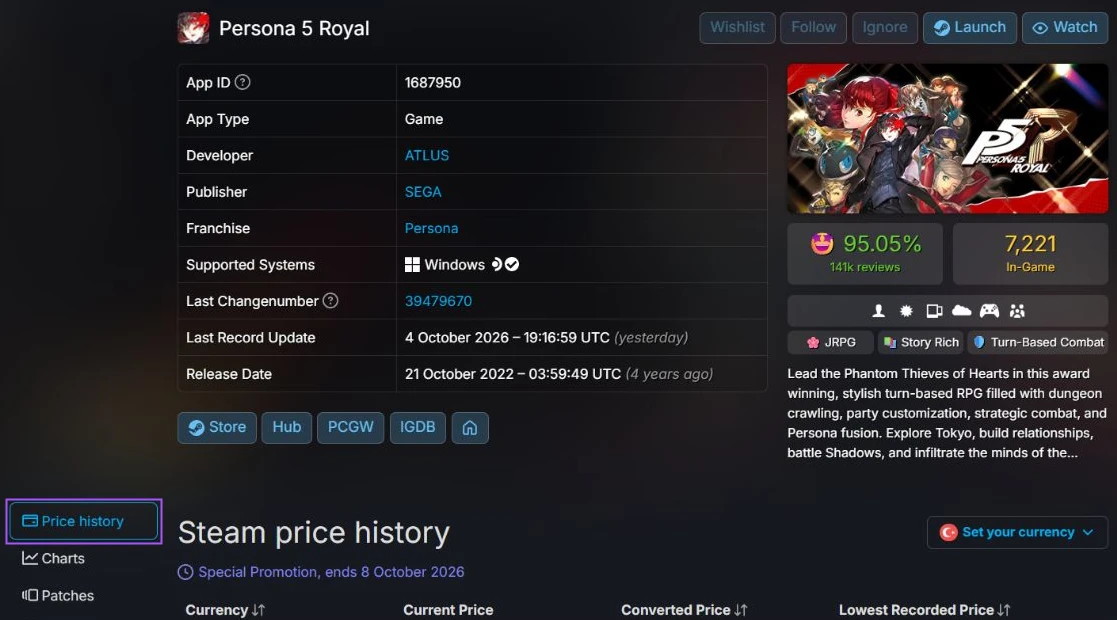
2. Select your region
This is one of the easiest steps to skip, and one of the most important.
Steam sells the same game at different prices in different countries, and the price you pay depends on your Steam account's store region. If you check the wrong region on SteamDB, you may end up judging a completely different price history.
In the pricing section, check that the selected currency or region matches your Steam store region. For example:
- Türkiye: "MENA - U.S. Dollar" (Türkiye has been part of this region since November 2023)
- Eurozone: "Euro"
- United Kingdom: "British Pound"
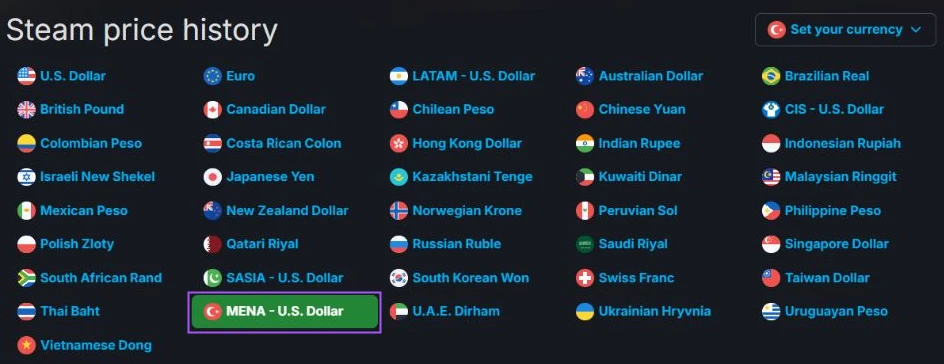
Your selected region changes the price summary and price history chart. The regional comparison table on the page will still continue to show prices for other regions.
3. Look at two lines: Current Price and Lowest Recorded Price
After selecting your region, there are two figures you should pay attention to:
- Current Price: The game's current price and, if applicable, its current discount.
- Lowest Recorded Price: The lowest price SteamDB has recorded for that region, along with the date when that price was first seen.

The basic rule is simple:
- If the current price matches the lowest recorded price, the game is currently at the lowest Steam price SteamDB has recorded for your selected region. That does not automatically mean you should buy it, but it does mean SteamDB has not recorded a lower Steam price.
- If the current price is higher than the lowest recorded price, the game has been cheaper before. The next question is how large that difference is.
One important detail: a "historical low" does not necessarily mean the game reached that price only once. It only means SteamDB has never recorded a lower price. The same low may have appeared several times before. To understand that, you need to look at the chart.
4. Read the price history chart
Further down the page, SteamDB shows how the game's price has changed over time. This chart tells you something the two headline numbers cannot: how often does this price come back?
One note: without signing in to SteamDB, only a limited portion of the price history may be visible. To see the full history, you need to sign in for free with your Steam account. If the chart only shows the last few months, this is probably why.
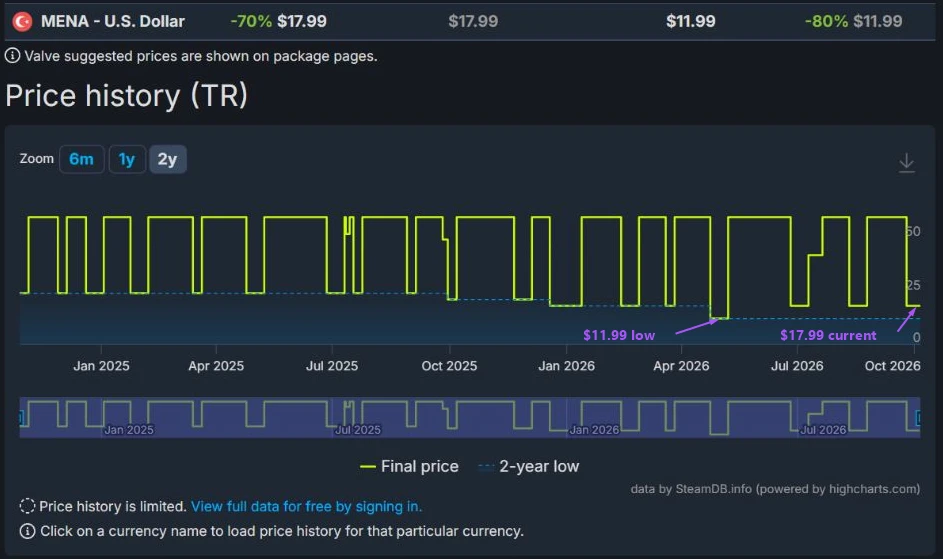
There are three common patterns worth looking for:
- Stair-step pattern: The game drops to roughly the same price during each major sale, then returns to its regular price. That tells you the current price has appeared repeatedly in the past rather than being a one-off deal.
- Gradual decline: Each sale has pushed the price slightly lower than the previous one. Historically, waiting has resulted in better prices.
- One-off dip: The game once dropped much lower than usual and never returned to that level. In this case, the all-time low may represent an unusual event rather than the game's normal sale price.
5. A real example
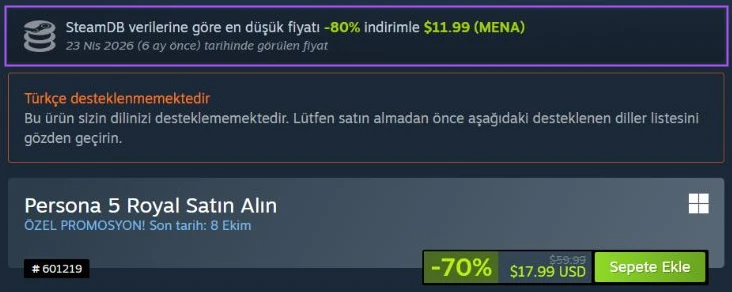
During Steam's 2026 Autumn Sale, Persona 5 Royal is listed at $17.99 with a large "70% off" label. At first glance, that sounds like a strong deal.
But when the MENA region is selected on SteamDB, the picture changes. The same game previously fell as low as $11.99 at 80% off. In other words, the current "deep discount" price is around 50% more expensive than the lowest recorded price for the region.
(Prices checked on October 5, 2026, for the MENA - U.S. Dollar region.)
The discount percentage alone is not enough to judge a deal. What matters is how today's price compares with the game's previous prices.
6. When is the next sale?
SteamDB's main menu includes a "When is next sale?" page that shows the dates of Steam's major seasonal sales. If a game is not cheap enough today, this gives you an idea of when the next major sale is coming.
There is one Steam rule worth knowing. Under Steam's standard discount rules, a game normally has to wait 30 days after one discount ends before another discount can begin.
However, Steam's four major seasonal sales — Spring, Summer, Autumn, and Winter — are exempt from this cooldown. That means a game can appear at a discount during two major sales in relatively quick succession.
There is still an important limitation: major seasonal sales are exempt from the waiting period between discounts, but they are not exempt from the 30-day restriction following a game's release or a price increase. So a newly released game, or one that recently had its base price increased, may still be unable to go on sale even during a major Steam event.
Three details worth keeping in mind
Which edition are you looking at? A game's standard edition, deluxe edition, and bundles can all have different price histories. SteamDB's main game page generally focuses on the base game. To check the price of a bundle or another package, open the "Packages" tab on the game page.
Regional price history can have gaps. If Steam changes the pricing region used for a country, the new region's price history only begins from that point onward. For example, Türkiye's MENA-USD price history does not cover the period before November 2023, when Steam prices in Türkiye were still listed in Turkish lira.
Past prices do not guarantee future discounts. If a price has appeared several times before, that tells you how the game behaved in the past. It does not mean the publisher has to offer the same discount again. The chart gives you context, not a promise.
Bonus: The browser extension
SteamDB also offers a free browser extension that can display the lowest recorded price directly on Steam store pages. With the extension installed, you do not have to search every game separately on SteamDB just to see whether the current deal is good.
Evaluating a Steam discount only takes a few seconds: select your region, compare the current price with the lowest recorded price, and take a quick look at the chart.
No matter how large the red discount percentage looks, the real question is always the same:
Have we seen this price before?
We used this method to sort what to buy now and what to leave for winter in: Steam Autumn Sale: What Should You Buy Now, and What Should You Leave Until Winter?
TagsSteam